Fig. 1 — Displacement u(x, t) of a plucked string.
▾ plectrum, ● pickup.
Click the string to pluck it somewhere else.
Featured in
“One of the most technically impressive free synthesizers released in recent years.”
Audio Plugins for Free
“Exactly the kind of tool the underground scene should be shouting about … The sound design headroom here beats plenty of commercial physical-modeling synths we’ve paid for.”
Time To House
“The GUI looks like something from a maths textbook, which is fitting, and it’s well put together.”
Bedroom Producers Blog
“A nice free physical modeling synthesizer with a slightly different engine concept.”
Microtuning support: Connects to MTS-ESP devices, so PartialString can play in any scale or temperament. (With bug affecting repeated notes fixed since v1.2.0)
New tuning control: Option to keep PartialString in-tune (but still inharmonic) at low accuracies.
Mod wheel support: Your keyboard's mod wheel is now routed to control the pickup LFO amount.
Update checks: PartialString will now (optionally) automatically check for updates if online.
Method
1Model
PartialString simulates the vibration of a plucked string by numerically solving the
one-dimensional wave equation in real time using the finite-difference time-domain (FDTD) method.
The string is represented as a list of displacements in memory. A lower note requires a longer string,
which needs more points to represent it. You can then excite the string at any point along its length,
and the FDTD scheme will compute how that change in displacement propagates. A pickup measures the
displacement at a chosen location, and this generates the audio output.
10-voice polyphony is supported (up to 10 simultaneous strings), but this is dynamically adjusted
based on your computer's capability and the lengths of the string being simulated (see Section 3. Performance).
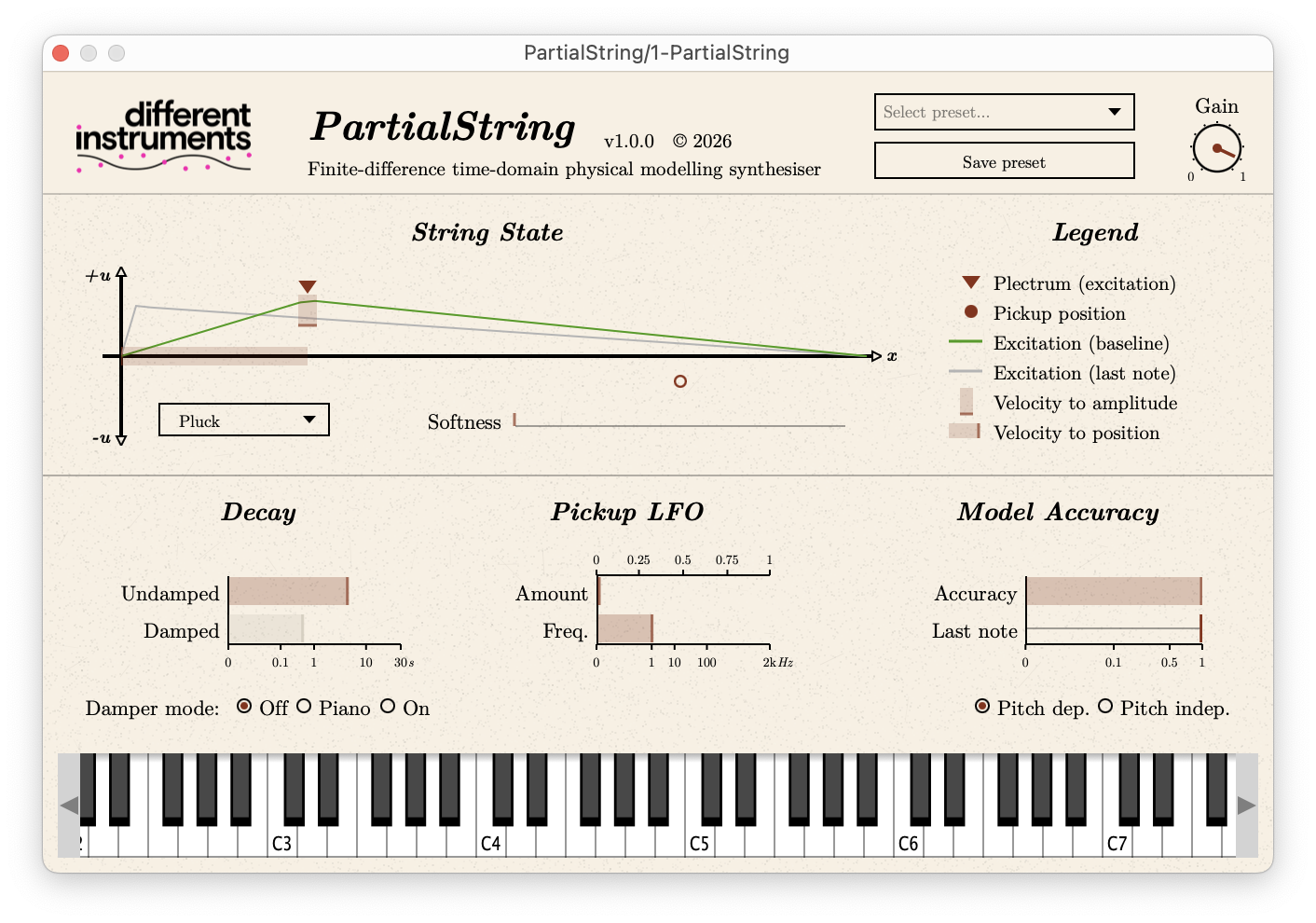
Fig. 2 — The PartialString interface.
2Controls
You can set the position and shape of the excitation, both velocity-sensitive. An LFO can sweep
the pickup position, up to audio rate for AM-like sidebands. Your keyboard's mod wheel is routed
to control the LFO amount (adding to the amount set with the GUI control). The string's decay time
is adjustable, with or without dampers applied. The dampers can behave like a piano's, closing when
a note ends. Combined with a long undamped decay, this makes pad-like sounds. Reducing the simulation
accuracy generates unrealistic, soft, inharmonic and (optionally) atonal sounds. Accuracy can be set
constant for all notes, or proportional to string length (which can help prevent CPU overload on less-capable
machines).
PartialString is an MTS-ESP client. It will receive tuning data from a running MTS-ESP master such as
ODDSOUND MTS-ESP Mini, including multi-channel mappings and
scales with 12 or fewer notes. If no MTS-ESP master is present, PartialString will remain tuned to equal
temperament.
4Performance
Simultaneously simulating many low notes (long strings) accurately is quite computationally intensive.
On less capable computers, PartialString will automatically limit the number of sounding voices to prevent CPU overload,
and this is indicated on the UI. You may notice that the synth behaves monophonically in low registers.
There is an option to prevent too-low notes (those estimated to cause overload on your machine even when played
monophonically) from sounding, or to automatically pitch them up an octave or two to maintain performance. This
option only takes effect when the synth is being used in real-time (i.e. not when your DAW is bouncing or freezing
tracks).
On Apple Silicon Macs (M-series), running an Intel-based DAW forces the plugin to run through the Rosetta 2
translation layer, which can significantly reduce CPU performance. For the best results, ensure you install
and run an Apple Silicon native (or 'Universal') version of your DAW.
5Checking for updates
PartialString will attempt to check for a newer version each time it opens, or once every 24 hours: whichever
period is longer. You can disable automatic checks, or force an update check, by right clicking on the "PartialString"
header at the top of the plugin.
6Installation and troubleshooting
PartialString doesn't have an installer. You will receive a .zip containing the required files. You will need to manually
move them to the audio plugin directory on your computer, following the instructions for your platform in README.txt.
If you are updating from an earlier version of PartialString and the device does not appear in your DAW, you may need to
rescan or "hard" rescan your plugins - see README.txt and your DAW's manual for more information.
Download
PartialString v1.2.1 — free, or pay what you want.
VST is a registered trademark of Steinberg Media Technologies GmbH.
Audio Units is a technology of Apple Inc.
About
Different Instruments is a solo side-project I've been (very occasionally) working on since releasing
gostringsynth in 2022. Back in 2009, I finished my MSc at the University of Edinburgh,
supervised by Stefan Bilbao, during which I investigated finite-difference models for musical applications.
This is an attempt to revive that work now that personal computers have suitable computational ability.
By day, I work as a biomedical engineer, developing technologies for ultrasonics, optics and photoacoustics.